Creator Tools Reels Safe Zone Preview

FREE CREATOR TOOL · GROW

Instagram Reels Safe Zone Checker for Photos and Videos

Upload an image or play a video locally to preview Instagram Reel captions, usernames, like and share buttons, and adjustable safe zones.

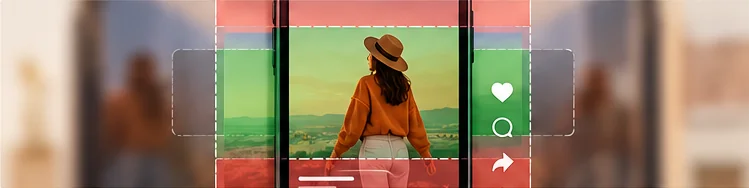
A vertical video of a creator with green clear-space guides and red caption/action overlay areas.

YOUR WORKSPACE

Let's make something.

Inputs and files stay in your browser.

Approximate layout
More options (optional)
Crop guide
Media fit
Expanded caption example
Illustrative interface
Show shaded risk areas
Show safe area

These overlays are adjustable estimates, not official platform measurements. Device size, an expanded caption and an ad call to action can change the visible area. Check the final post in each platform's preview.

LIVE PREVIEW

Your preview.

Organic Reel · approximate overlay

Reels ⋯
@your.handle

Your caption goes here

♫ Original audio

Shaded areas and crop guides are estimates. Test your final post in the platform.

What does this tool do?

Before publishing a Reel, check that your headline, face, logo and call to action remain visible behind Instagram-style controls. Choose a photo or a locally stored video, then inspect it inside a vertical 9:16 phone preview. The interactive overlay illustrates where a username, caption, sound label and buttons may overlap your content.

How to use it and example

Choose an organic Reel or a more conservative Reel ad planning preset. Play or pause your video, scrub to important frames and move the top, bottom and right-side guides as needed. Keep background imagery full-screen but place information that must remain legible well within the protected area. The simulation is illustrative: Instagram placement, app version and device can affect the real interface.

MAKE IT YOURS

Give your work a home.

Bring your links, offers, and creative work together on Social Shelf.

Create your free shelf →

Frequently asked questions

Is this a real Instagram Reel screenshot?

No. It is an illustrative user-interface overlay. Use the Instagram publishing preview as your final check.

Do my videos leave my device?

No. The local-preview approach plays files inside the browser without uploading them.

Can I inspect a specific moment in a video?

Yes. Pause the video or move the playback slider to check whether important details overlap a risk area.

Are Reel ad margins different from organic Reel margins?

They can be. Ads can add calls to action and extra overlays, so use separate ad-oriented guides and verify the placement.